Tuesday, August 28, 2012

Tuesday, May 22, 2012
Enable Assertions in Netbeans 7
Hello All,
Some people were asking how they can enable assertions in Netbeans.Here is the simple answer.
In the command line execution you can add the argument -ea (enable assertions) to the run command like : java -ea myApp.java
In netbeans,
Right click on your project name and select properties,
Click Run in the leftside panel
Then, in the right, write -ea in the input box beside VM Options, Then you are done.

This is the same way you can add any runtime parameters to netbeans
Friday, May 13, 2011
Installing tomcat6 Ubuntu 10.10
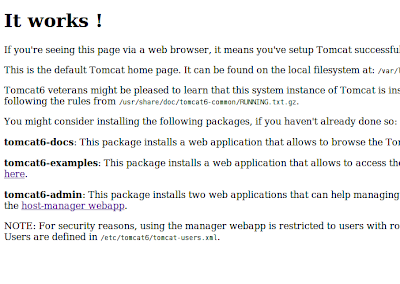

sudo /etc/init.d/tomcat6 start
sudo /etc/init.d/tomcat6 stop
sudo /etc/init.d/tomcat6 restart
sudo /etc/init.d/tomcat6 status
if you are running multiple web services, you may be in need to change the tomcat port (default 8080) to another UN-USED port number.
This can be done by editing the /etc/tomcat6/server.xml
Thursday, May 12, 2011
Copy Virtual Machine ( Hard Disk VDI) in virtual box
simply issue the following command from the terminal( Linux) or cmd (windows):
Wednesday, May 4, 2011
Add "open in terminal" to ubuntu menu
Hello,
Issue this command and you will find "Open in terminal" option appears in the shotcut menu while you are inside folders and write click in empty space.
This will open that path directly in terminal.
sudo apt-get install nautilus-open-terminal
Restart nautlius
killall nautlius
best wishes,
MSaudi.
msaudi.blogspot.com
Install Arial Font Ubuntu
just issue the following 2 commands as a root and accept any upcoming messages (click tab to move between options )
sudo apt-get install ttf-mscorefonts-installer
dpkg-reconfigure ttf-mscorefonts-installer
Accept some license issues and so, just by clicking Ok to the popup dialogues
you will got this message when you done
All done, no errors.
All fonts downloaded and installed.
Updating fontconfig cache for /usr/share/fonts/truetype/msttcorefonts
Good Luck,
Msaudi
msaudi.blogspot.com
Tuesday, May 3, 2011
RedHat Package Manager rpm guide
Monday, May 2, 2011
Change gnome Window Buttons Position and Arrangement UBUNTU
many of people (including me) does not like the max, min and close buttons on the left of the window title bar. Here is how to change position and arrangement if u want so.
Terminal> gconf-editor
go to: /apps/metacity/general
Change the 'button_layout' key to "menu:minimize,maximize,close"
And here (in the value ) you can change the arrangement like "menu:close,minimize,maximize"
Get information about your Ubuntu version
Here is a list of commands to help you finding information about Ubuntu Version and related kernel information:
cat /etc/issue
cat /etc/lsb-release
uname -a [rvu]
Sunday, April 17, 2011
Understanding Streams in Java
Understanding Streams in Java
PART I
By: Mohammed Saudi.A Data Stream is a flow of data between data source and data sink (the data goes to it).
Data source or sink could be for example disk file, device or network socket.
Two types of streams available in java ; Byte streams and Character streams. They differ in the level they are dealing with data; either data is read/written in 8-bit fashion ( byte stream) or in 16-bit unicode character fashion (character based).
If you are not working with images or sounds, it would be easier and better to use character-based streams; they handle the conversion and encoding stuff.
There is also a helpful classes ( java.io.InputStreamReader and java.io.OutputStreamWriter) that handle the gap between those two types. They convert byte data into character-based.
DataInputStream and DataOutputStream. are typical examples.
DataOutputStream(OutputStream out)
DataInputStream(InputStream in)
Examples of Byte Stream classes are
InputStreamReader, OutputStreamWriter, BufferedReader and BufferedWriter.
Examples of character Stream classes ( data sink streams) are
FileReader and FileWriter


===== Reading Files using byte-based streams ====
/*This Program reads "myInputFile.txt" file byte by byte and write the data into the file "myOutputFile.txt"
you should have myInputFile.txt in the same path of this java file
By: Mohammed Saudi.
www.visiontutoring.net
*/
import java.io.FileInputStream;
import java.io.FileOutputStream;
import java.io.IOException;
public class ReadBytes {
public static void main(String[] args) throws IOException {
FileInputStream inStream = null;
FileOutputStream outStream = null;
try {
inStream = new FileInputStream("myInputFile.txt");
outStream = new FileOutputStream("myOutputFile.txt");
int c; //I use int here because I use the read function blow which returns an integer.
while ((c = inStream.read()) != -1) {
outStream.write(c);
}
}
catch (Exception fe){
System.out.println(fe.getMessage());
}
finally {
if (inStream != null) {
inStream.close();
}
if (outStream != null) {
outStream.close();
}
}
}
}
===== Reading Files using character-based streams ====
/*This Program is the same as "ReadBytes" except it uses filereader and filewritter classes
you should have myInputFile.txt in the same path of this java file
* note: you may have a problem in character encoding when using filewritter class.
If so, use the OutputStreamWriter on a FileOutputStream instead.
By: Mohammed Saudi.
www.visiontutoring.net
*/
import java.io.*;
// Displays contents of a file
//(e.g. java Type app.ini)
public class ReadChars
{
public static void main(
String args[]) throws Exception
{
// Open input/output and setup variables
FileReader fr = new FileReader("myInputFile.txt");
FileWriter fw = new FileWriter("myOutputFile.txt");
char cToReadIn[] = new char[1000];
int read = 0;
// Read (and print) till end of file
while ((read = fr.read(cToReadIn)) != -1)
{
fw.write(cToReadIn);
}
// Close shop
fr.close();
fw.close();
}
}
Wednesday, April 13, 2011
fix firefox youtube fullscreen error in ubuntu
Friday, April 8, 2011
Install gcc windows

 4- keep clicking Next as there is no changes required.
 NOTE: You can install the C++ compiler -If you want - by just clicking the check box besides C++ compiler


Thursday, April 7, 2011
Installing VMware player ubuntu
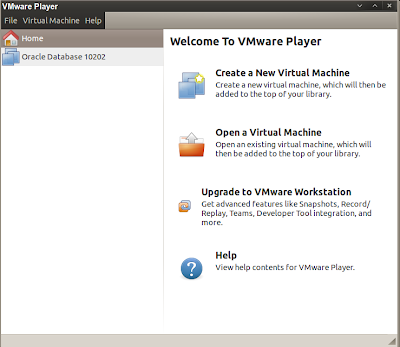

VMWare offers a free software called VMWare player which you can use to work with virtual machines. of course It has less features than the Work Station version like the ability to make a team and record your WM session but you still can have your work done with the FREE version.
gksudo bash ./VMware-Player-xxxxxxxx
where xxxx is the version details.This will run a GUI installer, follow the instruction and after you finish, you will find it installed in Applications, System Tools , VMware playerEnjoy !.Monday, April 4, 2011
Configuring Proxy Settings Manually Ubuntu
sudo gedit /etc/apt/apt.conf &
then inside apt.conf file write your proxy settings in the following format:
for http:
Acquire::http::Proxy "http://proxy_server_here:port_here";
for ftp: example
Acquire::ftp::Proxy "ftp://10.200.100.100:8080";
If you want to change this, just remove the lines we just wrote.
have fun
Wednesday, March 30, 2011
Get your 4 Giga Ram ( or more) to work under ubuntu 10.10
Usually ubuntu 10.10 (the 32-bit version) does not support 4 giga ram addressing, But the 64-bit version do.
To get your 32-bit version to work you need to install the following:
linux-headers-server
linux-image-server
linux-server
linux-generic-pae
linux-headers-generic-pae
so go ahead and update the system then apt-get install "the above list"
$ sudo apt-get update
$ sudo sudo apt-get install linux-headers-server linux-image-server linux-server
$ sudo apt-get install linux-generic-pae linux-headers-generic-pae
reboot your system ... and have fun !.
Wednesday, March 23, 2011
install .rpm packages in Ubuntu
install alien package
sudo apt-get install alien
then simply run
alien package.rpm
Sunday, March 6, 2011
Install and start Oracle 10g Express in Ubuntu 10.10
Add this line to /etc/apt/sources.list file:
deb http://oss.oracle.com/debian unstable main non-free
Next, you will need to add the GPG key.
wget http://oss.oracle.com/el4/RPM-GPG-KEY-oracle -O- | sudo apt-key add -
As root, type:
apt-get update
To install the XE database server, apt-get 'oracle-xe-universal' or 'oracle-xe' (Western European support only).
apt-get install oracle-xe-universal
If you only need the XE client, type
apt-get install oracle-xe-client
----------------------------------------------------------
Then
As root, type:
/etc/init.d/oracle-xe configure
Edit your .bashrc file to include the lines:
ORACLE_HOME=/usr/lib/oracle/xe/app/oracle/product/10.2.0/server PATH=$PATH:$ORACLE_HOME/bin export ORACLE_HOME export ORACLE_SID=XE
export PATH
Start a new bash shell for the changes to take effect.
To log in as a database administrator:
conn sys as sysdba ; Then write your password
To Access database home from HTTP
http://localhost:8080/apex/
To add new user to the system and give him dba privilages, write the following in the SQL Plus CMD
create user write_user_name identified by write_user_password;
grant dba to user_name;
To unlock the HR account to work with examples provided by Oracle.
alter user HR account unlock ; alter user HR identified by $password ; exit
-----------------------------------------------------
To get the history and arrows keys to work:
Download qgplus , Click Here
after you download gqlplus,
1. find your path variable:
echo $PATH
you should see this path in there:
/usr/lib/oracle/xe/app/oracle/product/10.2.0/server/b
2. Extract the gqplus file you have downloaded and take out the gqlplus executable from the linux folder inside it.
3. place the executable in any of the path directories.
e.g. Copy it here :/usr/lib/oracle/xe/app/oracle/product/10.2.0/server/bin
Then from the terminal run it.
qglplus
Have Fun :) .
References:
- https://help.ubuntu.com/community/Oracle
- https://help.ubuntu.com/community/Oracle10g#head-35cee01075d83fad1bb353beac13b27bda3fee32
- http://ubuntuforums.org/showthread.php?t=320659